
GET GREAT LEGAL GRAPHICS at an AFFORDABLE COST
A How-To Manual for Do-It-Yourself-ers (and Those Who Aren't!)
By Karyn J. Taylor

In the Age of PowerPoint®, practically everyone tries to be a graphic artist, trial attorneys included. But while it’s certainly arguable that a trial attorney’s time might be better spent filing motions or developing case strategy during the run-up to trial, untold legions of them will take a stab at creating their own demonstratives for court.
Some DIY lawyers will be successful: they will create images that actually sway juries to see their cases as their clients do. But most DIY-ers, sad to say, will not. Lured into a false sense of security by the deceptively easy-to-use PowerPoint®, they’ll churn out slide decks full of bullet points and consider the job done. Then the verdict will come in, and they'll realize, much too late, that the jury (bored to tears) didn’t read all that text and never "got" the case-critical information the attorney hoped to convey. Then, and only then, will the DIY-ers realize that creating persuasive legal graphics isn’t as easy as it looks, and that PowerPoint®, for all its user-friendly simplicity, isn’t a panacea after all.
For those of you who have already fallen victim to the charms of PowerPoint® (but hope to do it better next time), and for those of you who still plan to try it (but want to get it right the first time), consider this to be Chapter One of your DIY Graphics Manual.
But even if you’ve never created your own courtroom graphics and routinely hire graphics professionals instead, do yourself a favor and commit the following pointers to memory. You’ll be a better-educated consumer (i.e., better at hiring the right people the first time, and better at working with them successfully when you do).
Wherever you fall on the legal graphics spectrum, getting good legal graphics starts with setting the right goals:
Goal #1: Make the Complex Simple
Great legal graphics are very simple. They are:
-
Easy to read
-
Easy to understand
-
Easy to remember
No matter how technical the subject matter, or how complicated the case, that rule applies across the board.
But “simple” graphics are not what we typically see when lawyers attempt to create their own demonstratives. Like most people, lawyers are naturally inclined to say (or show) way too much on any one graphic. In fact, they tend to add in everything but the kitchen sink! Doing so may cut down on the total number of graphics they create, but that just overwhelms the jury. Why? Beause people can only process so much at once. Give them too much information and they short circuit. (It's just easier for them to dismiss complex or overwhelming information as unimportant than it is to spend time trying to figure it out.)
In truth though, the everything-but-the-kitchen-sink approach to graphics is often the result of not knowing exactly what to say or what to show. For litigators, the goal should be to persuade the judge or jury to see the case from your client's perspective. But if you aren't clear on how to do that, your jurors may be lost as well.
Thus, the first step to getting great legal graphics is to take the time to figure out exactly what your case story should be. Skip this step, and your graphics will fail to deliver a clear message. Skip this step and you put your verdict at risk. So rather than play Russian roulette with your graphics or your case, follow this tried-and-true, step-by-step procedure for honing a winning message:
Step 1: Craft Your "Logline"
The clearer you are about the story you're telling, the clearer the message your graphics can convey. In Hollywood, screenwriters develop a "logline"—a one- or two-sentence description of the movie they plan to write—then use it to pitch their ideas to studio executives. A good logline instantly intrigues the studio head and makes him or her eager to hear details of plot and character. S/he's "hooked."
Litigators hoping to "hook" jurors’ attention and make them anxious to hear the case story you'll reveal during trial should do the same. In other words…
Boil your complicated case story down to ONE short and easy-to-remember sentence: "Ladies and Gentlemen, this is a case about __________." That one sentence now becomes the "spine" of your case story---the unifying "throughline" around which you can craft your case strategy, case themes, Opening Statement, Closing Argument, Direct, Cross, and graphics.
Not sure what your logline should be? In essence, your logline should encapsulate the underlying story of the case—i.e., what the case is really about. For example, the case may be a patent infringement case, but it may really be a case about corporate greed, and that’s what you tell jurors as you start your Opening Statement. Or perhaps it's really about a former employee’s desire to “get even” with the boss who fired him, so he purposely copied a competitor's work knowing his boss would get blamed. Whatever the crux of the human story, summarize that in your logline. (Guaranteed that your jurors will be hooked!) But remember: Keep it short. In Hollywood, a logline must be 35 words or less, and you'd be wise to follow that rule.
Step 2: Distill Your "Bottom-Line-Take-Away Messages"™
Once you've identified your logline, break it down into its parts, i.e., its themes and “Bottom-Line-Take-Away Messages.” Themes are simply the key premises on which your case is based. Perhaps, in our patent infringement case about corporate greed, one prosecutorial theme might be “The ends justified the means,” encapsulating the attitude of a Board of Directors that pressured company management to boost revenue “at all costs.”
If that’s your theme, then the Bottom-Line-Take-Away Messages would be the “headlines” your judge or jury needs to see to "get" the story you're trying to tell: “Board Meeting Minutes Show Management Pressured to Boost Revenues ‘Or Else’.” Or “D. Smith Email to E. Jones: ‘I’ll fire Edwards if he doesn’t produce.’”
Use Bottom-Line-Takeaway-Messages as titles on your demonstratives so there’s no chance the jury will miss the messages your slides are meant to convey. Fail to add such titles and jurors may misinterpret the slide, drawing erroneous conclusions that do nothing to help your case.
Step 3: Simplify Your Depictions
Use the body of your graphic to illustrate the message in your title. That is, place in the body of the slide or exhibit board the actual corporate Board Meeting minutes, the smoking gun email, or any other documentary or demonstrative evidence that proves the assertion in the title.
But keep it simple. Don't obscure your thematic message with...
The “Terrible Too's" of Graphic Design:
-
Too many words
-
Too many fonts
-
Too many colors
-
Too many illustrations
-
Too many things going on on one page
This is where so many DIY-ers go wrong: they let the ease of using PowerPoint® tempt them into “getting creative,” and then take it too far. PowerPoint® has become the “go-to” app in litigation and rightly so: it can be a powerful and convenient tool both in and out of court. (Not to mention that it can save clients tons of money, as well). But...
Lawyers should use PowerPoint® judiciously for best results. To wit:
PowerPoint® is great for doing document call-outs where the important text of a smoking gun document can be “called out” (i.e., enlarged and highlighted) for ease of viewing on a slide.
PowerPoint® is also great for creating simple pie charts, line graphs, or bar graphs, etc. -- especially if you animate the bars or lines to show changes over time.
But don’t use PowerPoint’s animation tools with wild abandon -- i.e., don't make the text “fly” in, spin in, pixilate, or do anything else fancy in an attempt to give your otherwise boring slide some pizzazz. You’ll just upstage your slide’s substantive message and make your presentation look hokey -- the true mark of an amateur!
And don’t do a lot of bullet-point slides. Illustrate your points with drawings, photos, charts, or graphs instead. If there’s no way to illustrate your message and you’re forced to use bullet points, shorten every bullet to no more than a couple of words in length and list no more than 3-5 bullets per page. It’s better to create five slides to make five key points (or to have five slides “build” toward one key point) than to squeeze a ton of words onto a single slide that no one will take time to read.
Instead, DO make your graphic easy to digest. The closer a graphic is to being fully self-explanatory (needing no input from you to be understood), the better. Jurors’ minds wander. If you create self-explanatory graphics, you’ll ensure that the juror whose mind did wander during your, or your witness’s, verbal explanation will be able to tune back in without missing the point.

A self-explanatory graphic.
Step 4: Use Multiple Presentation Formats
Too much of even a good thing can backfire. A gazillion PowerPoint slides, no matter how well-designed, will ultimately bore the jury, and 25 exhibit boards will be terribly unwieldy in court. Mix it up. A presentation that incorporates slides, exhibit boards, animation, video, 3D models, and/or live demonstrations keeps the content entertaining, the pace brisk, and the jury riveted.
For best results, use an experienced “hot seat” operator (HSO) so that you can:
(a) Focus on your presentation and let the HSO find and display your demonstratives;
(b) Add, delete, or annotate graphics on the fly if instructed to do so by the court;
(c) Have a tech-savvy person on hand to troubleshoot if anything goes wrong.
Step 5: Know your Limitations
The objective of a graphic is to show, not tell, so if your skills as a DIY artist aren’t up to the task, call in the professionals. You may be comfortable adding simple ClipArt illustrations to your slides (avoid the amateurish cartoons and stick with photos), but to do anything else, you’ll probably need help. Call in the pros to create technical or medical illustrations, animations, recreations, or scale models. Call in the pros to do exhibit boards as well. Illustrations that are too large or complex to fit comfortably (or legibly) on a computer screen are best designed in professional graphic programs like Adobe Creative Suite, and only graphics professionals will have the skill and the software to create them. The average lawyer will not.
Whatever you do, don’t immortalize your amateurish drawings on exhibit boards or slides! At best, you’ll look cheap; at worst, you’ll look incompetent, and that will undermine both your credibility and your case.
Step 6: Think Conceptually
Graphics that present case facts and evidence in easily understandable ways are called Reiterative Graphics. Reiterative Graphics are typically lists, bar graphs, line graphs, pie charts, or timelines that condense reams of case data into summaries that allow jurors to discern the "bottom line" quickly and easily. These types of graphics can be invaluable in virtually every type of case. But they will probably not win your case.
To win at jury trial, you need Conceptual Graphics—graphics that work subliminally to appeal not just to the intellect, but to the heart.
DIY-ers can create great Conceptual Graphics on occasion, but it’s a relatively rare occurrence when they do. That’s not a value judgment; it’s a matter of training. Lawyers are trained to think logically. They typically rely on the rigorous and impartial application of the law to make their points---not on the gut or emotional reactions that usually govern and motivate jurors. (This is why legalistic arguments frequently land like lead balloons in court: jurors just can't relate.)
If time is short, or you’re too logical a thinker to think conceptually, call in an experienced Graphics Consultant. Legal graphics pros have spent years learning how to translate legal concepts into jury-friendly demonstratives, and the really good ones have spent even more years figuring out how to push jurors’ emotional buttons. Let a pro help you translate your legal arguments into emotionally compelling ones and thereby identify the most persuasive way to make your case. It's a way you might not find on your own.
For maximum impact, weave Conceptual Graphics throughout your presentation and your expert witness's presentations, too. A well-designed Conceptual Graphic may just make the Ph.D-level scientific or technical information easier to understand, thus reinforcing your case themes, supporting your case strategy, and increasing the odds you'll win.
Goal #2: Stay within Your Client’s Budget
Grandma used to say, "An ounce of prevention is worth a pound of cure," and when it comes to legal graphics, those words ring true. No matter what your concept—or your graphics budget—poor planning at the outset will ultimately cost you a bundle before the job is done.
Rule of Thumb: The quality of the final "product" will be a function of two things: TIME and MONEY. And that rule holds whether you're creating a simple pie chart, an animated tutorial (or, for that matter, a corporate event, a feature film, or a Broadway show).
This is the immutable LAW OF PRODUCTION, and we illustrate the law with a triangle (Figure 1) which shows that if you have equal amounts of time and money to devote to creating a quality product, the triangle will be equilateral (i.e., of equal length on all sides).
Figure 1.
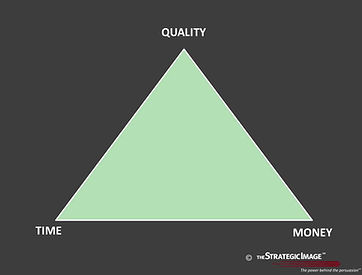
If, on the other hand, you want a quality product, but have little time to devote to its creation, you'll have to spend more money to achieve it.
That may translate into hiring extra help, hiring a higher caliber team from the outset, paying premium prices for quick turnaround on a short deadline, or all of the above.
If that's your situation, your circumstances will be depicted by the elongation of the “money” side of the triangle (Figure 2).
Figure 2.

Conversely, if you have the luxury of time, you can:
-
wait for the light bulb to go on in your head...
-
let the creative ideas unfold as they may...
-
achieve a high quality product...
-
all without spending a fortune on extra help, better help, rush charges, overtime, or overnight shipping.
In this case, the “time” side of the triangle elongates as shown in Figure 3.
Figure 3.

In litigation, however, the choice between spending time or spending money is rarely yours to make. Deadlines are court-imposed, budgets are determined by the client, and both are usually limited. So the only resources you'll be able to control are the USE of your allotted time and the USE of your allotted budget.
Squander the allotted time and the quality of your graphics may suffer. Why? Because the creative process can't be rushed. Great ideas usually don't come all at once, and when they do, they'll still take time to implement.
Squander the allotted time and the cost of your graphics may increase dramatically. Missing court deadlines is not an option, and you well know the price you’ll pay for going over your client’s budget to make up for lost time!
So to get great legal graphics at the lowest possible cost (whatever your budget or whatever your time frame), follow these equally immutable...
RULES of PRODUCTION:
Rule #1: Start Early!
The single best way to keep graphic production costs down is to start developing graphic exhibits EARLY in the litigation lifecycle. What’s “early”? Shortly after your pleadings are filed!
By starting early you will...
-
Have time to develop all-important, case-critical Conceptual Graphics
-
Avoid costly mistakes more likely to occur under intense deadline pressure
-
Avoid rush charges, overtime, and/or huge shipping bills
This point is so important that it bears repeating: The single best way to BLOW your graphics budget is to wait until the last minute to get started!
Rule #2: Measure Twice; Cut Once
Carpenters live by this rule, and litigators should too. In other words, if you don't carefully plan out your case strategy (and thus your concomitant graphics strategy) long before production begins, you may be forced to (a) live with your mistakes, or (b) pay a premium to correct them.
The reason is simple: a production is like a house of cards. Remove one card, change one item in a graphic, or worse, change your case strategy, and an unavoidable chain of events may occur that sends your client's budget spiraling through the roof. In fact, just making "simple" changes like changing the color or size of an exhibit can require scores of additional man- or computer-hours to complete.
Thus, when it comes to making changes, these Corollaries apply:
Corollary #1:
The later a change comes in the course of production (i.e., the closer to completion of the project), the MORE the change will cost to implement.
Corollary #2:
The more sophisticated the medium (or the larger or more complex the production), the more ANY change will cost.
Of course, while working hard to stay within budget, both you and your client can easily lose sight of what’s truly at stake: your case! So to make sure the tail doesn’t start wagging the dog, strive to reach …
Goal #3: Think Value, Not Price
Given the huge cost of going to trial, even lawyers who hire graphics professionals frequently search for the cheapest ones. That approach is understandable, but it can be self-defeating. Why? Because the value of any graphic is determined, not by its cost, but by its ability to persuade the jury! And that’s the only yardstick by which the quality of a graphic should be judged.
But a powerfully persuasive graphic doesn't have to be expensive. It can be as simple as a single sentence on a single PowerPoint slide. The slide costs next-to-nothing to produce, but the concept behind the slide may be worth millions at verdict time.
Will the cheapest graphics team in town produce that winning Conceptual Graphic? Maybe. But the odds are not in their favor, nor in yours. Or will any graphics team have better odds of coming up with the winning concept if you call them at the last minute? Definitely not.
While we may have convinced you to start working on graphics early, we realize that convincing your clients may be another matter entirely. Clients are often reluctant to do graphics early because 99% of cases settle before ever getting to court. Clients thus think that doing graphics early is a colossal waste of money.
But ask yourselves (and your clients) this question: What if you don’t settle before trial? Will you be OK going to trial armed with graphics your team rushed to conceive and prepare at the last minute? Rushing can sabotage the quality and effectiveness of graphics to the point where whatever you've spent will be too much -- and that's a certainty if you lose.
Or ask yourselves this: Will your case strategy be stronger if you wait until the last minute to plot it out? Probably not.
But what does case strategy have to do with graphics? Starting graphics early forces you to work on case strategy, too. After all, your graphics team can't create graphics until you've clearly identified what story you're going to tell, what themes you're going to stress, and all the rest. More importantly, starting early gives you time to test strategy, themes, Bottom-Line-Take-Away Messages, and graphics -- whether you test with focus groups, mock jurors, or just the secretarial pool.
Starting graphics early also gives you time to FIX anything that tests poorly, fails to resonate, or points to a probable loss. What's the value of having time to change course? HUGE! Budgets are important, but consistently putting cost -- whether in time, money, or both -– ahead of VALUE can be “penny wise and pound foolish.” Why? Because it typically comes with a significant loss in your ability to PERSUADE!
The NET RESULT of FOCUSING ON VALUE vs. The NET RESULT of FOCUSING ON COST


So when deciding how to spend your always limited resources, consider not just the monetary costs, but the value of winning over the cost of losing because...
Losing jeopardizes everything:
-
Your ability to collect your fees
-
Future business or referrals from your client
-
Your firm's financial health
-
Your client's financial health
-
Your reputation
-
Your career
With all that on the line, what really costs more? Starting graphics early or pinching pennies to save a dime?
A popular adage in legal circles holds that "Jury trials are a crapshoot." But we disagree. Why? Because when you give yourself the time and money to do them well, litigation graphics can dramatically improve your odds of winning, and that's a maxim years of jury research have long since proven to be true.
The cost/benefit ratio is thus well worth considering because in any game -- even in Craps -- it's only fun when you WIN.
(c) 2026 The Strategic Image